Continuous penetration testing is security for the modern age. It’s a move away from the old-school, once-a-year audit towards a living, breathing security process that’s baked right into how you build software.
Think of it this way: traditional pentesting is like an annual doctor's check-up. Continuous testing is like wearing a fitness tracker that monitors your vitals 24/7, alerting you the second something looks off.
Moving Beyond Annual Audits to Continuous Security
For a long time, the gold standard for app security was the point-in-time penetration test. You'd hire a team of ethical hackers, they’d spend a week or two hammering on your system, and then hand you a massive report. Then, radio silence until next year. That model made sense when software was released on a yearly or quarterly schedule.
But that's not how we build things anymore. In a world of agile development and CI/CD pipelines, new code can be pushed to production multiple times a day. For fast-moving teams building on platforms like Supabase or Firebase, the annual check-up isn't just outdated—it's a massive risk.
Your application's attack surface—every single potential entry point for an attacker—is constantly changing. It shifts with every feature release, every bug fix, and every configuration tweak. An annual pentest only captures a single snapshot in time, leaving you completely blind to vulnerabilities introduced the very next day.
The Problem with Periodic Security
The real danger of the old model is what we call the "window of exploitability." It’s the time between a vulnerability being introduced into your code and it actually being discovered. With annual testing, that window can be a whopping 364 days. A single misconfigured Row Level Security (RLS) policy in Supabase or a leaky Firebase rule pushed on a Tuesday could sit there, wide open, until next year's audit.
This isn’t just a theoretical problem. The UK has seen a relentless rise in cyber breaches, making a continuous approach to security a necessity. A shocking 74% of large businesses reported a breach or attack, with 42% of small businesses also being hit. These numbers tell a clear story: threats don't wait for your annual audit. They are persistent and always evolving, ready to disrupt your business and compromise your data. It’s a stark reminder of why one-off scans are no longer enough for today's dynamic applications. You can read the full cybersecurity report to get a clearer picture of the current threat landscape.
Adapting Security to the Speed of Development
Continuous security is more than just running scans more frequently; it's a complete shift in philosophy. It’s about weaving security into the very fabric of your development process, making it an automated and integral part of the workflow, not a special event. This approach means your security posture strengthens right alongside your application as you innovate.
The ultimate goal is to shrink that window of exploitability from months down to minutes. When you achieve that, you can:
- Innovate Safely: Ship new features with confidence, knowing you aren't introducing new blind spots.
- Reduce Remediation Costs: Finding a bug early is exponentially cheaper and easier to fix than dealing with a full-blown breach.
- Build User Trust: Nothing shows you're serious about protecting customer data like a proactive security stance.
This transforms security from a roadblock into an enabler, giving you the freedom to build and scale your application quickly and securely.
How Continuous Penetration Testing Actually Works
To really get your head around continuous penetration testing, it's best to stop thinking of it as a single event. It’s more like a living, cyclical process—an engine running quietly alongside your development sprints, embedding security into the very fabric of how you build software, rather than being a disruptive, once-a-year headache. The whole system is designed to provide a constant feedback loop.
This approach shifts security from a calendar appointment to an always-on function that’s deeply integrated into your workflow. The diagram below really brings this shift in mindset to life.
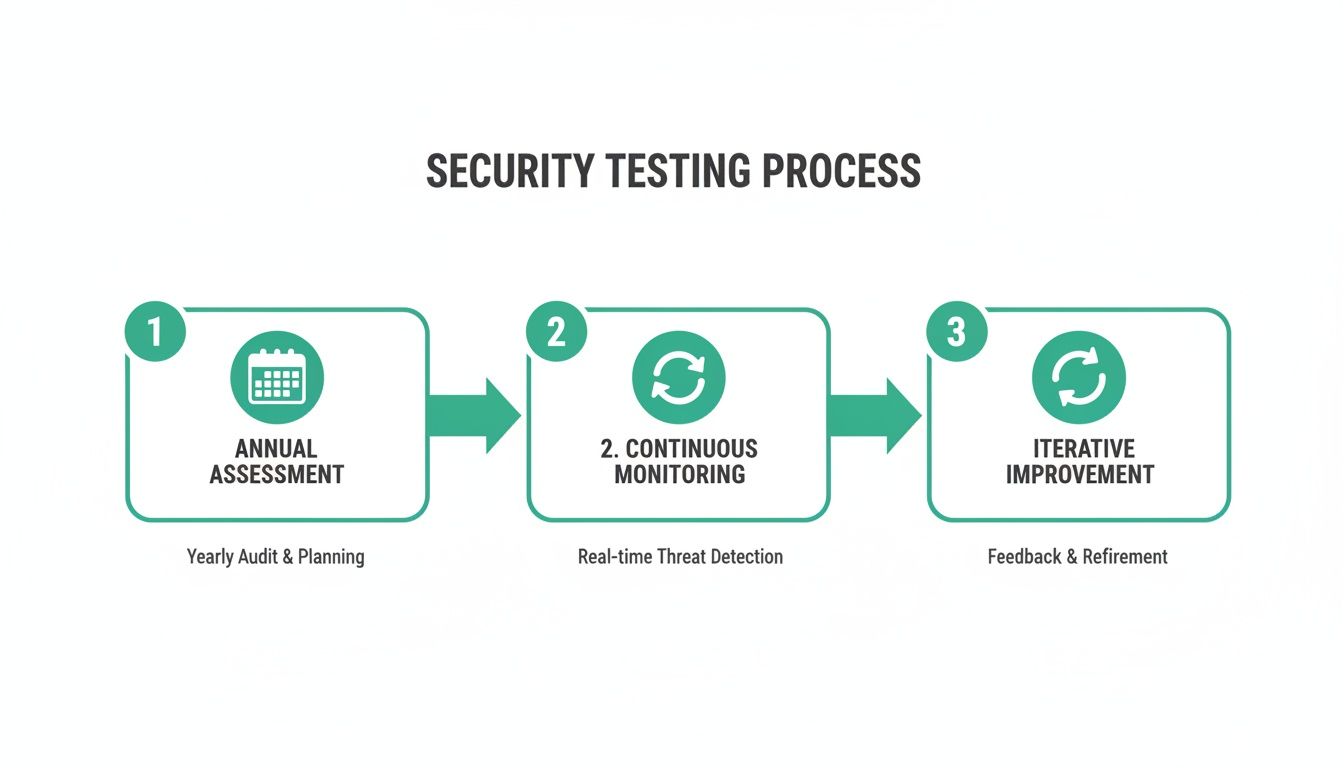
You can see how the old model leaves massive gaps where you're flying blind, whereas the continuous model ensures security keeps up with every single code push and infrastructure change.
The Automated Discovery and Scanning Phase
It all kicks off with automated asset discovery. A continuous penetration testing platform is constantly mapping out your digital footprint. Every time your team deploys a new API endpoint, spins up a new database function, or pushes an update to a mobile app, the system spots it. This isn’t just about finding servers; it's about understanding the individual Lego bricks of modern applications.
As soon as a new or changed asset is found, it’s immediately put under the microscope with continuous vulnerability scanning. This is miles ahead of basic checks. Specialised tools, like AuditYour.App's Continuous Guard, are built to understand the unique architecture of platforms like Supabase and Firebase. They automatically probe for common, yet critical, misconfigurations.
- Exposed Row Level Security (RLS) policies that could accidentally leak sensitive user data.
- Publicly accessible database functions (RPCs) that might let an attacker perform unauthorised actions.
- Hardcoded secrets or API keys mistakenly left in your frontend code or mobile app bundles.
These scans run on autopilot, often triggered by a new commit in your CI/CD pipeline, making sure no change ever goes unchecked. For a much deeper dive, you can explore our full guide on how automated security scanning works.
From Raw Data to Actionable Intelligence
Now, a constant stream of scan data is just noise without smart analysis. This is where the process gets really clever. The system doesn’t just bombard your team with every little thing it finds; it filters and prioritises findings to separate genuine threats from low-risk background chatter. This is vital, especially when you consider that 62% of tested targets reveal medium-to-critical vulnerabilities. With the UK's pen testing market growing at a 4.5% CAGR, you simply can't rely on manual checks to keep up. An effective platform cuts through this chaos to deliver focused alerts, allowing your team to act decisively.
The real aim here is to eliminate alert fatigue. A great continuous testing platform uses context and severity ratings to surface only the issues that truly need your immediate attention. It turns a firehose of data into a manageable trickle of actionable insights.
The final, and arguably most important, step is seamless integration. Instead of getting a PDF report in your inbox weeks later, modern systems feed alerts directly into the tools your developers live in every day, like Slack, Jira, or GitHub. And these aren't just vague warnings.
For instance, if a leaky Supabase RLS policy is discovered, the alert will contain:
- A clear, plain-English explanation of the flaw.
- Proof of exactly how it can be exploited.
- A ready-to-use SQL snippet to patch the vulnerability.
This is what closes the loop. It transforms security from a roadblock into an automated ally, empowering developers to own and fix security issues quickly within their existing workflow. It means you can innovate at speed without ever having to compromise on protection.
Securing Your Supabase, Firebase, and Mobile Apps
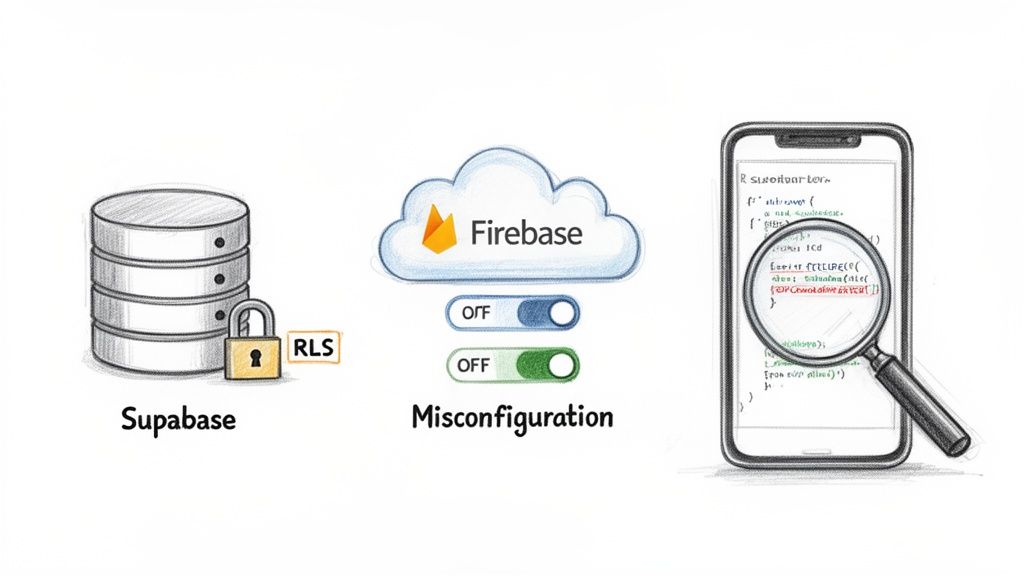
Let's be honest: generic security tools are often completely lost when faced with modern tech stacks. They might poke around for old-school server vulnerabilities but are totally blind to the kind of misconfigurations that can bring a Supabase or Firebase project to its knees. A proper continuous penetration testing approach has to be built for the platform it’s protecting.
The whole game has changed. We're not just scanning network ports anymore; we’re scrutinising database policies, checking cloud function permissions, and digging into the code bundled inside our mobile apps. Each of these platforms presents its own unique set of challenges, so let's break them down.
The Nuances of Supabase Security
Supabase is fantastic. It gives you the power of a PostgreSQL database exposed directly to your app through APIs. But with that power comes a huge responsibility: Row Level Security (RLS). Think of RLS policies as the bouncers for your data, deciding exactly who gets to read or write each specific row. Get one policy wrong, and the consequences can be catastrophic.
A classic, and dangerous, mistake is writing an RLS policy that’s a bit too generous. You might intend to give a user access to their own profile, but a small logical error could accidentally let them view every user's profile. A generic scanner won't have a clue about the logic you’ve written; it takes a specialised tool to actually test these policies by trying to read and write data as different users.
A truly effective continuous penetration testing tool for Supabase doesn't just check if RLS is enabled. It actively fuzzes the RLS logic, attempting to bypass policies to prove actual data leakage, turning a theoretical risk into a confirmed vulnerability.
Another critical area is your database functions (RPCs). These are the custom SQL functions you can call straight from your front end. If left unsecured, they can become a backdoor for attackers to do all sorts of nasty things, like deleting data or giving themselves admin rights. A continuous scanner needs to automatically find these RPCs and hammer them with tests to check for permission flaws.
Tackling Firebase Misconfigurations
Firebase runs into similar issues. Its strength lies in its real-time database and Firestore security rules, which are JSON-based configurations that control who can access what. This logic can get complicated in a hurry, and a tiny syntax error can leave entire collections of your data wide open to the public.
Here are a few common Firebase pitfalls that a specialised continuous testing platform is designed to catch:
- Insecure Default Rules: When you're just starting a project, it's common to use open read/write rules to make development easier. Forgetting to lock these down before going live is one of the most frequent causes of major data breaches.
- Authentication Bypasses: Your rules might fail to correctly check a user's
auth.uid, letting unauthenticated strangers access or change data they have no business touching. - Wildcard Escalation: Using wildcards too freely in your rule paths can unintentionally grant much broader permissions than you ever meant to, creating subtle but serious security holes.
The whole point of continuous penetration testing here is to analyse these rules for logical flaws, not just for correct syntax. It’s about spotting the loopholes that lead to data exposure. Understanding these API security threats is vital, which is why we've put together a detailed guide on API security best practices.
Unpacking Mobile Application Risks
With mobile apps, the security focus shifts to what's inside the application package itself—the IPA for iOS or the APK for Android. If you're not careful, these files can be a treasure trove for attackers. When you ship your app to the store, you're essentially handing over a bundle of your front-end code.
A solid continuous testing workflow for mobile apps involves automatically decompiling these packages and scanning them for critical issues before they ever get near an app store.
Primary Mobile App Threats:
- Hardcoded Secrets: It happens more than you'd think. Developers accidentally leave API keys, auth tokens, or other sensitive credentials right in the app's code. Once that app is public, those secrets are as good as gone.
- Insecure Frontend Code: The JavaScript or Dart code in your app can reveal sensitive business logic or expose API endpoints that were never meant for public consumption.
- Leaky Third-Party SDKs: The various Software Development Kits (SDKs) you integrate can sometimes bring their own vulnerabilities or insecure communication habits along for the ride.
By plugging mobile app scanning directly into your CI/CD pipeline, you can catch these problems automatically with every single build. This platform-specific approach—for Supabase, Firebase, and mobile—is what makes continuous penetration testing so powerful. It goes far beyond generic checklists to give you a deep, real-world understanding of the risks your applications are facing, making advanced security a reality even for solo developers and small, fast-moving teams.
Measuring the Success of Your Security Programme
There’s an old saying: you can’t improve what you don’t measure. For years, security was treated as a vague cost centre—a necessary expense, but one without clear, tangible returns. Continuous penetration testing completely changes that. It turns security into a data-driven process with measurable outcomes that show real value.
When you move from a reactive to a proactive security model, you can track meaningful progress. The conversation shifts from, "Did we pass our yearly audit?" to "How fast are we finding and fixing flaws every single day?" This is how you build genuine trust with your customers and protect your business.
Key Metrics That Truly Matter
To get a real sense of your security programme's health, you need to focus on metrics that measure speed and efficiency. Forget about vanity metrics. The real goal is to shrink the window of opportunity for attackers.
Two of the most important metrics you should be tracking are:
- Mean Time to Detect (MTTD): This is the average time it takes for your system to spot a new vulnerability after it’s been introduced. In a continuous model, you want to see this drop from months to mere minutes or hours.
- Mean Time to Remediate (MTTR): This tracks how long it takes your team to actually fix a vulnerability once it's been found. A low MTTR proves your security process isn't just about finding problems—it’s about enabling developers to solve them quickly.
Together, these numbers tell a powerful story. A consistently low MTTD and MTTR is hard evidence that your security posture is getting stronger and more resilient over time.
Defining Your Security SLAs
Once you start tracking these metrics, you can begin to establish Service Level Agreements (SLAs) for remediation. An SLA is simply a commitment to fix vulnerabilities within a specific timeframe, prioritised by their severity. This gets rid of any ambiguity and ensures the most critical issues get the urgent attention they need.
This isn’t just a nice-to-have; it's a core part of modern security. The global penetration testing market is expected to reach USD 2.71 billion by 2026, which shows just how seriously businesses are taking this. With over 25,000 CVEs published in a single year—including hundreds of critical remote code execution flaws—the old way of doing things just doesn't cut it anymore. You can explore the full penetration testing market analysis to see what's driving this trend.
An SLA isn't just an internal policy; it's a promise to your users. It demonstrates that you have a structured, predictable process for handling security threats, which is a cornerstone of building and maintaining trust.
To make this concrete, you'll want to establish clear timelines for your team. Here's what a typical SLA structure, based on industry standards, might look like.
Example Security SLAs by Vulnerability Severity
| Severity Level | CVSS Score Range | Recommended Remediation SLA | | :--- | :--- | :--- | | Critical | 9.0 - 10.0 | Within 24 hours | | High | 7.0 - 8.9 | Within 7 days | | Medium | 4.0 - 6.9 | Within 30 days | | Low | 0.1 - 3.9 | Within 90 days |
Putting clear SLAs in place transforms vulnerability management from a chaotic fire drill into an organised, efficient process. It ensures engineering time is spent where it will have the biggest impact, protecting your application and your users from the most significant threats first. This data-driven approach finally lets you show the tangible return on your security investment.
Common Mistakes and How to Avoid Them
Moving to a continuous security model is a game-changer, but the path is often littered with common trip-ups. I've seen many teams start with the best intentions, only to have their new programme stall out and become a source of frustration. Knowing what these pitfalls are ahead of time is the key to building a continuous testing workflow that actually works.
Right off the bat, one of the biggest errors is treating security as a ‘set and forget’ system. You can't just flip a switch on a scanner and call it a day. A continuous approach demands constant engagement—fine-tuning your tools, acting on the feedback, and weaving security into the very fabric of your development process. If you don't commit to this, even the most sophisticated tools end up as expensive shelfware.
Overlooking the Human Element
A classic mistake is putting all your faith in automation. Don't get me wrong, automated scanners are brilliant for finding known vulnerabilities quickly and at scale. But they're fundamentally predictable. They follow a script and completely lack the creativity and intuition of a human attacker, often missing the complex, multi-step attacks that exploit business logic or require a bit of out-of-the-box thinking.
The 2017 Equifax breach serves as a stark reminder of this. An automated scanner reportedly missed the critical vulnerability that attackers later used to steal the data of 147 million people. A pair of human eyes on the problem would have almost certainly spotted the flaw.
Automation is your metal detector—it’s excellent for finding things quickly across a wide area. But you still need an expert to analyse the findings, dig in the right places, and determine whether you’ve found treasure or just a bottle cap.
The sweet spot is a hybrid model that blends automated scanning with expert human reviews. Let the machines handle the high-volume, repetitive work, freeing up your human experts to focus on the nuanced threats, architectural weaknesses, and the kind of creative problem-solving that mimics a real adversary.
Drowning Developers in Noise
Another way these programmes fail is by bombarding developers with a firehose of low-quality alerts. If every scan churns out dozens of findings—many of them false positives or trivial issues—developers will quickly develop "alert fatigue" and start tuning them out. This is incredibly dangerous because it means a truly critical vulnerability could easily get lost in all that noise.
Effective continuous penetration testing is all about the signal, not the noise. It’s about smart filtering and ruthless prioritisation. A good system doesn't just report a potential issue; it validates it, checks if it can actually be exploited, and only flags the threats that genuinely matter. That way, when a developer gets a security alert, they know it's real and needs their immediate attention.
To keep the noise down, focus on these practices:
- Prioritise by Exploitability: Zero in on vulnerabilities that are actively exploitable, not just theoretical weaknesses.
- Provide Actionable Fixes: Alerts should always come with clear, specific advice on how to fix the problem, like a ready-to-use SQL snippet to patch a leaky RLS policy.
- Integrate Seamlessly: Push alerts directly into the tools your developers already use (think Jira, Slack, or GitHub) to make security a natural part of their workflow.
Choosing Generic Tools for Specialised Stacks
Finally, I often see teams trying to use generic security tools for highly specialised platforms like Supabase or Firebase. This is a huge misstep. A standard web scanner simply doesn't understand the intricacies of things like Row Level Security (RLS) policies or the complex logic baked into Firebase security rules. It might give you a clean bill of health while your entire user database is, in reality, wide open.
Your security tools have to speak the same language as your tech stack. If you're building on Supabase, you need a tool that can actively fuzz RLS logic to prove data is leaking. For a mobile app, you need something that can decompile the IPA or APK file to hunt for hardcoded secrets. Opting for a platform-specific solution, like AuditYour.App's Continuous Guard, ensures your scans are deep, relevant, and capable of finding the kinds of misconfigurations that pose the biggest threats to modern apps.
By sidestepping these common mistakes, you can build a security programme that truly supports your team, allowing you to innovate and ship code with confidence.
Your Step-by-Step Implementation Roadmap
Alright, let's move from theory to action. Getting started with continuous penetration testing isn't as daunting as it might sound. The key is to break it down into manageable phases, allowing your team to build up its security maturity and ship code with genuine confidence. Think of this roadmap as your guide from the first discovery scan to a fully embedded security programme.
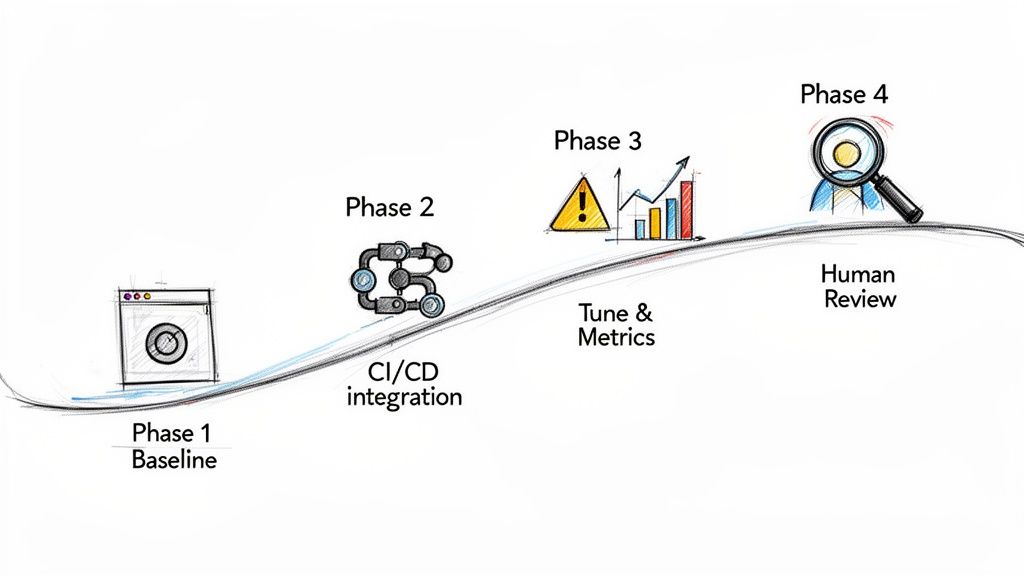
This structured approach takes the guesswork out of the equation, giving you a clear, actionable plan for building a robust, modern security workflow.
Phase 1: Establish Your Security Baseline
First things first: you need to know where you stand. Before you can improve, you need an honest snapshot of your current attack surface and vulnerabilities. This initial audit isn’t just a box-ticking exercise; it’s the essential foundation for your entire programme.
The goal here is to pinpoint your most glaring and immediate risks. A one-off, comprehensive scan using a platform-specific tool, like AuditYour.App’s Single Snapshot, is ideal for this. It will give you a detailed report on things like exposed database functions, leaky security rules, and any hardcoded secrets. Now you have a solid baseline to measure against.
Phase 2: Integrate and Automate
With your baseline in hand, it’s time to weave security directly into your development lifecycle. The aim is to make security checks as normal as running unit tests. This is where automation truly shines, turning security from a once-a-quarter event into a constant, everyday process.
You'll want to plug an automated scanner directly into your CI/CD pipeline. Configure it to trigger a security scan on every single commit or pull request. That simple step means no new code hits production without a security check-up, shrinking the potential window for an exploit from months down to mere minutes. This "shift left" approach is fundamental, and you can dive deeper into embedding security in the SDLC in our other guide.
This is the very heart of continuous penetration testing. By automating scans on every code change, you create a powerful, real-time feedback loop. It empowers developers to find and fix flaws as they write them, not weeks or months down the line.
Phase 3: Tune and Track Metrics
Once your automated system is humming along, your focus should shift to refinement. A firehose of raw data quickly becomes background noise. This phase is all about fine-tuning your alerts and tracking metrics that actually mean something and show real progress.
Start by customising the rules to slash false positives. You want your developers to get high-signal, actionable notifications they'll actually pay attention to. At the same time, begin tracking key performance indicators like Mean Time to Detect (MTTD) and Mean Time to Remediate (MTTR). These numbers give you hard evidence that your security programme is working and improving.
Phase 4: Expand with Human Expertise
Automation is brilliant for speed and scale, but it can’t replicate human creativity and intuition. The final phase of maturity is about layering expert-led reviews on top of your automated scanning. This hybrid approach gives you the best of both worlds.
Schedule periodic architectural reviews with seasoned security experts. They can dig into your business logic, database schemas, and complex access control patterns in a way that automated tools simply can’t. These human-led assessments are where you'll uncover the subtle, nuanced vulnerabilities that often slip through the cracks. This blend of machine efficiency and human ingenuity is the hallmark of a truly mature continuous security programme.
Frequently Asked Questions
Moving to a continuous security model is a big step, and it’s natural to have questions. Here are some of the most common ones we hear from teams who are making the switch.
How Is This Different from a Bug Bounty Programme?
It’s easy to mix these up, but they operate on completely different principles.
A bug bounty programme is reactive. You’re essentially crowdsourcing security by inviting researchers to poke holes in your live application, and you pay them for each valid bug they find. Think of it like putting a "wanted" poster out for vulnerabilities after the fact.
On the other hand, continuous penetration testing is proactive. It’s a structured, ongoing process designed to discover security weaknesses before your code is ever deployed. It’s about methodically checking every door and window as you build, not waiting to see if someone can break in later.
What Does Continuous Testing Cost for Startups?
Cost is a huge concern for any growing business, and the pricing reflects that. Forget about the massive, one-off invoices you’d get with traditional pentesting.
Modern continuous testing platforms typically use tiered subscriptions. This lets a startup begin with an affordable plan that covers core automated scanning. As the company grows and its security needs become more complex, it can scale up to plans that include more advanced features or on-demand expert reviews. This approach makes top-tier security accessible without a crippling upfront cost.
The key is value. The cost is a fraction of the potential financial and reputational damage from a breach, which can be an existential threat for an early-stage company.
How Do You Integrate This into a CI/CD Pipeline?
This is where it gets really powerful. The integration is designed to be smooth and slot directly into the way your team already works. It’s not about adding another cumbersome step to your process.
There are two common ways to kick off a security scan:
- Webhooks: Your CI/CD platform, whether it’s GitHub Actions or Jenkins, can send a simple webhook to the testing service right after a successful build.
- CLI Commands: You can add a single line to your deployment script that tells the service to start a scan.
This means every single code commit can be automatically checked for security flaws without a developer having to lift a finger. Security just becomes part of the rhythm of shipping code.
Ready to move from annual audits to always-on protection? AuditYour.App offers specialised continuous penetration testing for Supabase, Firebase, and mobile apps. Get your free security grade in minutes and see how Continuous Guard can protect your application as you build. Start your first scan at audityour.app.
Scan your app for this vulnerability
AuditYourApp automatically detects security misconfigurations in Supabase and Firebase projects. Get actionable remediation in minutes.
Run Free Scan